One blurry photo = instant NDA 1 2026 rejection. Don’t join the 25% of aspirants who fail before exam day—crushed by 7 Mistakes in NDA 2026 Application Form that UPSC rejects without appeal. A wrong date of birth, a mismatched name, or a poor document upload? Rejected. Months of hard work, gone. Dreams delayed by six months.
But here’s the good news: these mistakes are 100% preventable. This NDA Study guide reveals all 7 Mistakes in NDA 2026 Application Form + the exact correction window dates that can save your application if you catch errors in time. Master these before hitting submit, and you’ll avoid the rejection trap that blindsides thousands every year.
7 Mistakes in NDA 2026 Application Form
Thousands get rejected in the NDA Exam—not due to poor prep, but simple form errors like blurry photos and wrong DOB that UPSC rejects instantly. These 7 Mistakes in NDA 2026 Application Form below + their exact fixes + correction window dates will save your application and secure your exam hall ticket.

Mistake #1: Blurry or Wrong Photo (Instant Rejection)
Your photograph is the first thing UPSC’s AI verification system checks—and it’s unforgiving. A blurry, shadowy, or poorly lit photo triggers automatic rejection before any human even reviews your application. This single mistake accounts for 15–20% of all NDA 1 2026 rejections, yet it’s completely preventable.
| Requirement | Specification | Why It Matters |
|---|---|---|
| Size | 4×6 cm (exactly) | Wrong dimensions = auto-reject by system |
| Background | White or light, no shadows | UPSC AI struggles with dark/colored backgrounds |
| Age | Recent (within 6 months) | Outdated photos fail identity verification |
| Quality | Crystal clear, full face visible | Blurry photos fail OCR scanning |
| Expression & Appearance | Neutral expression, no tilts, no accessories | Sunglasses, tilts, smiles = rejection flag |
Common rejections happen when: Photos are taken in dim lighting, shadows cover half your face, you’re smiling unnaturally, wearing sunglasses, or the image is pixelated/blurry when uploaded.
Fix it right: Use a professional studio or shoot in natural daylight with a high-quality camera. Ensure your entire face is visible, centred, and shadow-free. Before final submission, preview your upload on the UPSC portal to confirm clarity. One test upload saves rejection.
Mistake #2: Wrong Date of Birth (DOB) Entry (Instant Disqualification)
Your date of birth isn’t just data—it’s your eligibility gate. Enter it wrong, and UPSC’s automated system flags you as ineligible, and your application gets rejected without human review. This is the second most common NDA 1 2026 application rejection, affecting thousands annually.
Why DOB matters: NDA eligibility requires candidates to be between 16.5 and 22 years old on the exam date. A single-digit error—entering 2003 instead of 2002, or mixing up day/month—can push you outside this window, making you ineligible instantly. UPSC cross-checks your DOB against your Aadhar, PAN, and 12th certificate; mismatches trigger automatic rejection.
Common DOB mistakes:
- Typos in day or month (25/12/2003 entered as 25/12/2002)
- DD/MM/YYYY vs. MM/DD/YYYY format confusion (Western vs. Indian format)
- Copying from the wrong document (old PAN with discrepancies)
Fix it right: Use the NDA Study official UPSC-based age calculator tool on our website to verify your exact age on exam day. Triple-check your DOB against your Aadhar card before submitting. Save a screenshot of your correct DOB from your government ID.
Correction window lifeline: Jan 25–31, 2026 (7-day correction period after application closes). If you spot a DOB error during this window, log in and correct it immediately—this is your only chance.
Mistake #3: Name Spelling Mismatch (Document Verification Failure)
Your name must match your government ID exactly—character for character. Even a single spelling variation causes UPSC’s verification system to flag a mismatch, delaying your admit card or rejecting you at the merit list stage. This seemingly small error has derailed hundreds of NDA aspirants.
Why name mismatches cause rejection: During document verification, UPSC compares your application name against your Aadhar, PAN, 12th certificate, and birth proof. If they don’t match perfectly, the system cannot verify your identity, and your application is held or rejected. There’s no “close enough”—UPSC’s database is strict.
Common name mistakes:
- Spelling variations (e.g., “Sharma” vs. “Sharme,” “Singh” vs. “Sinh”)
- Missing middle names or initials
- Using nicknames instead of formal legal names (e.g., “Raj” instead of “Rajendra”)
- Hindi-to-English transliteration inconsistency (e.g., “Raj” vs. “Raaj”)
- Punctuation errors (e.g., “O’Brien” vs. “Obrien”)
Fix it right: Copy your name directly from your Aadhar card and paste it into the application form. Don't retype—copying eliminates typos. Verify capitalisation and spacing match exactly.
Mistake #4: Educational Details Errors (Eligibility Rejection)
Your educational qualification is UPSC’s second verification checkpoint. Wrong marks, incorrect board name, or missing stream details trigger automatic rejection during document verification. This is among the most common NDA application form mistakes because aspirants often rush this section or copy from memory instead of their actual certificate.
Why educational errors cause rejection: UPSC verifies your 12th certificate against your application data. Any mismatch—wrong percentage, incorrect board, missing stream—means your application cannot be verified, and you’re rejected. Remember: 12th pass is mandatory for NDA eligibility. If your 12th exam is still pending, you’re ineligible and will be rejected.
| Mistake Type | Example | Consequence |
|---|---|---|
| System cannot match the certificate | Entering 68.5% instead of 58.5% (decimal typo) | Verification failure; rejection |
| Incorrect board name | Writing “Central Board” instead of “CBSE” | The system cannot match the certificate |
| Missing stream | Not specifying Science/Commerce/Arts | Eligibility verification blocked |
| Using expected marks | Submitting predicted marks instead of final marks | Ineligible if exam pending |
| Blurry certificate upload | Low-resolution scan; details unreadable | OCR fails; document rejected |
Fix it right: Open your original 12th mark sheet and certificate. Copy exact board name, verified percentage (to two decimal places), and stream. Upload a high-resolution, clearly legible certificate image. Double-check every number before submission.
Mistake #5: Poor Document Uploads (Technical Rejection)
Your documents are your proof. Upload a blurry scan, a wrong file format, or an oversized image, and UPSC’s system automatically rejects your application before verification even begins. This technical mistake prevents your entire application from being processed—no second chances, no appeals.
Why document quality matters: UPSC uses Optical Character Recognition (OCR) technology to scan and verify your uploaded documents. If your scan is too dark, pixelated, skewed, or in the wrong format, the OCR cannot read it, and your application is marked incomplete. The portal also has strict file size limits to prevent server overload—exceed them, and your upload fails silently.
| Document Type | Required Specification | Common Mistake |
|---|---|---|
| 12th Certificate | 300 DPI minimum, PDF or JPG, <5 MB | Smartphone photo at 72 DPI (too blurry) |
| Birth Proof (Aadhar/PAN) | All 4 corners visible, high contrast | Document tilted/partially cropped |
| Category Certificate (if applicable) | Cursive is too light; OCR cannot read | Faded photocopy, unreadable text |
| Signature Sample | Clear, 300+ DPI, white background | Cursive is too light; OCR cannot read it. |
| File Format | PDF or JPG only (no Word, PNG, HEIC) | Uploading .doc or .heic files rejected |
Fix it right: Use a scanner (library, school office) or a high-quality scanning app (CamScanner, Adobe Scan) at 300 DPI minimum. Ensure all corners of the document are visible, lighting is even, and text is crisp. Convert to PDF using online tools. Check file size before uploading—keep it under 5 MB. Test upload with a dummy document first to confirm portal acceptance.
Mistake #6: Category Selection Confusion (Eligibility & Verification Trap)
Your category selection determines your merit cutoff, interview weightage, and service allocation—one wrong choice can disqualify you or waste your shot at a better rank. Category confusion is a silent killer among NDA applicants because the rules seem simple, but have hidden traps that catch thousands unaware.
Why category mistakes cause rejection: UPSC verifies category claims against government records. False or ineligible category claims lead to immediate disqualification—not rejection. You’re blacklisted from future exams. OBC aspirants face the creamy layer trap: if your family income exceeds ₹8 lakh annually, you’re ineligible for the OBC quota and must apply as General. SC/ST claims require valid caste certificates issued within specific timeframes. Missing or invalid documents = rejection.
| Category | Key Eligibility Rule | Common Mistake | Consequence |
|---|---|---|---|
| General | No restrictions; all candidates eligible | N/A | Proceed normally |
| OBC | Family income <₹8 lakh annually (creamy layer rule) | Claiming OBC with ₹9 lakh income | Disqualification for false claim |
| SC/ST | Valid caste certificate required; issued within 3 years | Certificate expired or not submitted | Application rejected at verification |
| PWD (Disability) | Medical certificate + disability proof required | Submitting old/incomplete medical docs | Verification failure; rejection |
| EWS | Family income <₹8 lakh + General category | Claiming both OBC + EWS simultaneously | Application rejected for inconsistency |
Fix it right: Check your family's annual income against the creamy layer threshold. If OBC and income exceed ₹8 lakh, apply as General. Verify your caste certificate is valid and was issued recently. For SC/ST, ensure the certificate is from a competent authority. Upload all supporting documents clearly. Use the UPSC's official category eligibility FAQs to confirm your classification.
To avoid NDA 1 2026 form rejection: Don’t guess your category—verify it with your parents’ income documents and government ID. A false claim destroys your entire NDA career.
Mistake #7: Missing Correction Window (Your Last Lifeline)
You submitted your application and spotted an error. Panic sets in. But here’s the truth: most mistakes can be corrected if you act within the correction window. This 7-day grace period is your safety net—and missing it is the final, irreversible mistake that locks you out permanently.
🔴 NDA 1 2026 CORRECTION WINDOW – EXACT DATES
📋 APPLICATION SUBMISSION WINDOW
Starts: December 2025 (TBD – Check UPSC official notification)
Closes: January 2026 (TBD)
Time: 6 PM IST (portal locks exactly at deadline)

✏️ CORRECTION WINDOW (Your Lifeline)
Starts: January 25, 2026
Closes: January 31, 2026 @ 6 PM IST
⚠️ NO EXTENSIONS. Portal closes permanently.
What CAN be corrected: DOB, name spelling, photograph, phone/email, educational marks, category (with proof). What CANNOT be corrected: Exam centre, signature, core identity fields.
How to use it: Login → Click “Correct Application” → Edit field → Resubmit → Screenshot confirmation. The correction window saves 10–15% of aspirants annually from rejection.
Critical reminder: After 6 PM IST on January 31, 2026, the UPSC portal locks forever. No corrections possible. No appeals. Don't be the aspirant who discovered an error on Feb 1 and realized it's too late. Mark these dates NOW. Set phone reminders for Jan 24 (opens), Jan 30 (2 days left), and Jan 31 @ 5 PM IST (final hour).
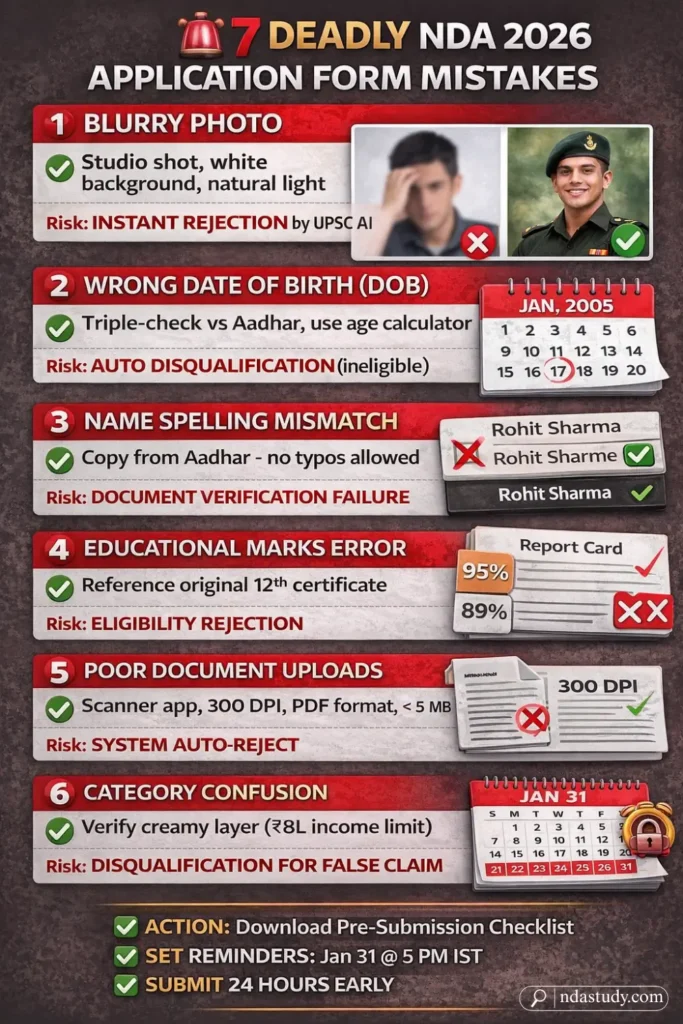
NDA 1 2026 Correction Window: Complete Guide (Your Safety Net Explained)
The correction window is UPSC’s built-in safety mechanism—a final 7-day window where you can fix application errors before they become permanent rejections.
Step-by-Step Correction Process:
Step 1: Log in to the UPSC Portal using your registered email and password. Find your submitted application dashboard.
Step 2: Click the “Correct Application” button (only visible during Jan 25–31, 2026). The portal unlocks editable fields.
Step 3: Edit Only the Affected Field—DOB, photo, name, marks, or category. Don’t overhaul your entire application. Triple-check before proceeding.
Step 4: Resubmit & Save the correction. UPSC generates a new confirmation email. Download and screenshot this proof immediately.
Step 5: Verify Email Confirmation. The new version replaces your old submission entirely.
Real-world impact: The correction window saves approximately 15% of NDA rejections annually. One aspirant corrects a blurry photo on Jan 28 = approval. Another discovers the error on Feb 1 after the window closes = rejection, career delayed 6 months.
Critical timeline: Jan 25 (opens) → Jan 31 @ 6 PM IST (closes permanently). Set phone reminders NOW. Act early; avoid last-minute server overload disasters.
Also Check: NDA Exam Countdown timer 2026 [LIVE]
Pre-Submission Checklist (Final Verification Before Clicking Submit)
Before you hit that submit button, run through this final checklist. Missing even one item can trigger rejection. Print this out or bookmark it—this is your last defence against the 7 mistakes.
✅ PHOTOGRAPH
☐ Clear, colored, high-resolution
☐ White or light background (no shadows)
☐ Recent (taken within 6 months)
☐ Full face visible, neutral expression
☐ No accessories, tilts, or smiles

✅ DATE OF BIRTH (DOB)
☐ Matches Aadhar/PAN exactly
☐ Age between 16.5–22 years on exam date
☐ Format: DD/MM/YYYY (verified with calculator i.e., NDA Study Age Calculator)
☐ Triple-checked for typos

✅ NAME
☐ Matches government ID exactly
☐ Correct spelling, capitalization, spacing
☐ No nicknames; use legal name only
☐ Hindi-English transliteration consistent

✅ DOCUMENTS
☐ 12th certificate (300 DPI, legible scan)
☐ Birth proof—Aadhar or PAN (all corners visible)
☐ Category certificate (if SC/ST/OBC/PWD)
☐ All files <5 MB, PDF or JPG format
☐ Preview upload on portal before final submit

✅ CATEGORY & ELIGIBILITY
☐ Category selection verified (OBC creamy layer checked)
☐ Supporting documents ready for upload
☐ No false claims or expired certificates

✅ SUBMISSION
☐ All fields filled—no blanks left
☐ Form preview checked completely
☐ Submitted 24+ hours before deadline
☐ Confirmation screenshot saved + emailed to yourself
Final step: After submission, you’ll receive a confirmation email with your registration number. Screenshot it. Please forward it to yourself. This is your proof.
FAQs | 7 Mistakes in NDA 2026 Application Form
1. Can I fix a blurry photograph after submitting my NDA 1 2026 application?
Yes—but only during the correction window (Jan 25–31, 2026). Log in to the UPSC portal, click “Correct Application,” upload a clear photo, and resubmit before 6 PM IST on Jan 31. Once the window closes, no photo corrections are possible. If your photo is rejected during verification, UPSC will send a resubmission notice with a specific timeframe to fix it. Act immediately when notified.
2. I realised my DOB is wrong AFTER the correction window closed. What happens now?
Your application will be rejected at the verification stage. UPSC cross-checks DOB against your Aadhar and 12th certificate; mismatches result in disqualification. You cannot appeal or correct it later. Your only option is to apply for the next NDA exam (6 months away). This mistake costs you half a year—don’t let it happen. Triple-check DOB before the Jan 31 deadline.
3. My name doesn’t match my 12th certificate exactly. Will I be rejected?
Yes. UPSC’s verification system requires exact matches between your application name and all government documents. Even spelling variations (“Sharma” vs. “Sharme”) cause rejection at document verification. Use the correction window immediately to fix this. Copy your name directly from Aadhar—don’t retype it.
4. When exactly is the NDA 1 2026 correction window, and can it be extended?
The correction window is January 25–31, 2026, closing at 6 PM IST on Jan 31. No extensions. The portal locks permanently after the deadline. UPSC doesn’t grant exceptions or time extensions for any reason. Mark these dates in your calendar NOW. Set phone reminders for Jan 24 (window opens), Jan 30 (final 24 hours), and Jan 31 @ 5 PM IST (1 hour left).
5. What if I can’t upload my documents in the correct format? Will the application be rejected?
Yes. UPSC only accepts PDF or JPG formats. Documents in Word, PNG, or HEIC formats are automatically rejected by the system. If your upload fails due to file format or size (>5 MB), your application becomes incomplete and is rejected. Use online conversion tools to convert your scans to PDF. Test upload a dummy document first to confirm portal acceptance before submitting sensitive documents.


![Is Mathematics Compulsory for NDA? Arts/Commerce Students Must Read This [EXCLUSIVE ]](https://ndastudy.com/wp-content/uploads/2025/12/Is-Mathematics-Compulsory-for-NDA-300x169.webp "Is Mathematics Compulsory for NDA? Arts/Commerce Students Must Read This [EXCLUSIVE ] 8")


