The UPSC NDA 1 2026 Correction Window is your second chance to fix application errors—and thousands of aspirants are missing it. Whether you misspelt your name, selected the wrong exam centre, or uploaded a blurry photo, this step-by-step guide with official screenshots will help you correct everything before the deadline closes permanently. Time is critical: the correction window has strict deadlines, and no extensions are granted. This guide covers exactly what you can edit, how to do it in 6 simple steps, and the official timelines you need to know right now. Don’t let a small error cost you your NDA dream.
What Is the NDA 1 2026 Correction Window?
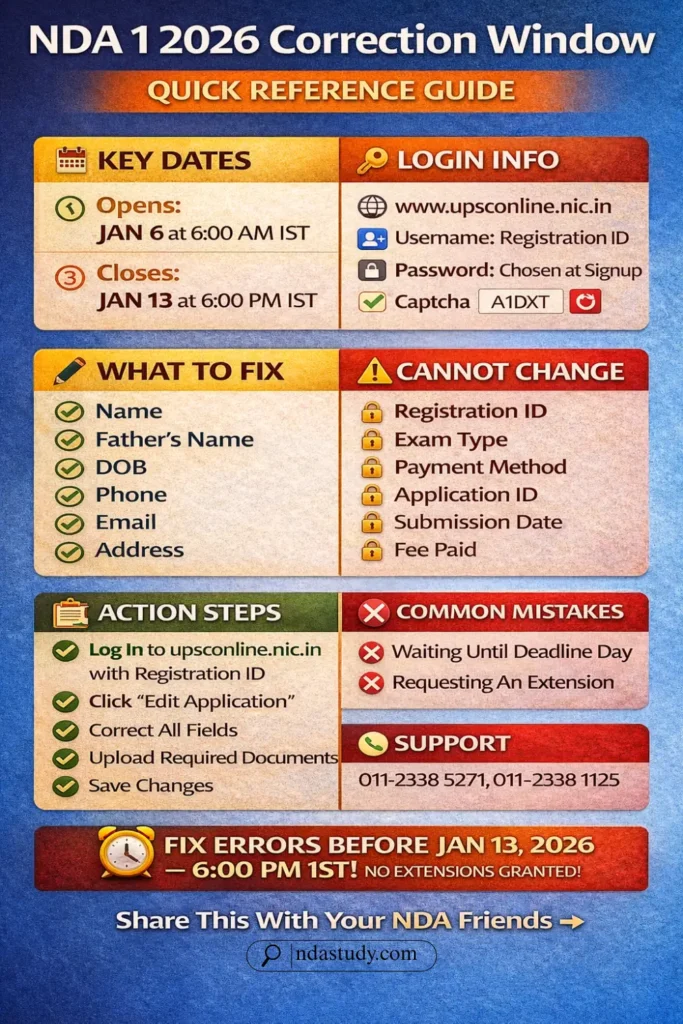
The NDA 1 2026 Correction Window is a limited-time period provided by UPSC where candidates can edit and modify their submitted applications after the initial deadline closes. This one-time facility opens shortly after applications end—typically in the first or second week of January 2026 for NDA 1—and stays active for 7 days, allowing fixes without extra fees.
UPSC created this window through its fairness policy to minimise rejections from honest mistakes like typos or wrong details, protecting aspirants during the new online portal transition. It targets unintentional errors such as misspelt names, blurry photos, incorrect exam centres, or educational mismatches that could derail your journey at document verification.
Key distinction: You can correct genuine errors (typos, document quality), but not intentional changes like switching exam types or withdrawing applications—these stay locked per UPSC rules on upsc.gov.in. Missing it finalises your form forever, risking rejection at verification or SSB—no appeals allowed. Act fast to safeguard your NDA shot.
NDA 1 2026 Correction Window: Important Dates & Deadlines
The UPSC NDA correction deadline 2026 is fast approaching—mark these dates now to avoid permanent application errors. The official NDA 1 2026 notification was released on December 10, 2025, via upsc.gov.in, with applications closing December 30, 2025. The correction window opens in the 2nd week of January 2026 (typically January 6-7), staying active for exactly 7 days—your only chance to fix details online at upsconline.nic.in.
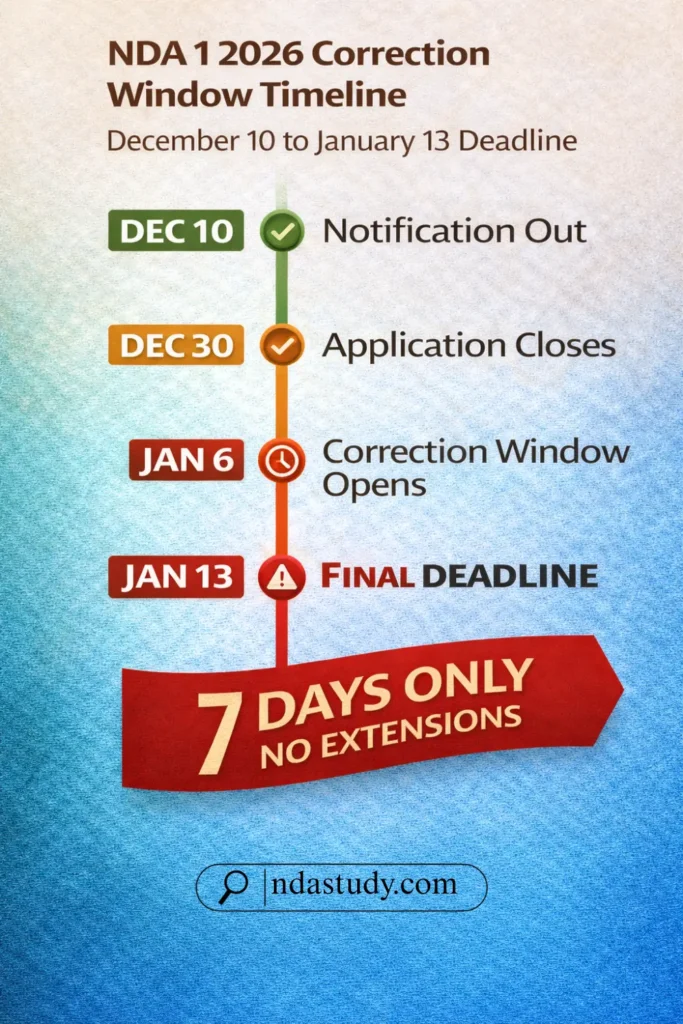
⚠️ CRITICAL: Correction Window Closes January 13, 2026, 6:00 PM IST ⚠️ No extensions granted—servers overload on the final day, so complete edits by January 12. All times follow Indian Standard Time (IST).
📅 Mark Your Calendar
| Event | Date | Time | Status |
|---|---|---|---|
| Notification Released | Dec 10, 2025 | — | ✅ Done |
| Application Closed | Dec 30, 2025 | 6:00 PM IST | ✅ Done |
| Correction Window Opens | Jan 6, 2026 | 10:00 AM IST | ⏳ Soon |
| Correction Window Closes | Jan 13, 2026 | 6:00 PM IST | ⏰ Critical |
Source: UPSC NDA 1 2026 patterns & reliable coaching updates
Missing this UPSC NDA correction deadline 2026 locks your form forever—act early for stress-free edits.
Step-by-Step Guide: How to Correct Your NDA 1 2026 Application
The NDA correction process can be simple if followed systematically. Below is a complete step-by-step guide for your NDA 1 2026 application editing—crafted to save time, prevent mistakes, and help you meet the UPSC’s correction deadline confidently.
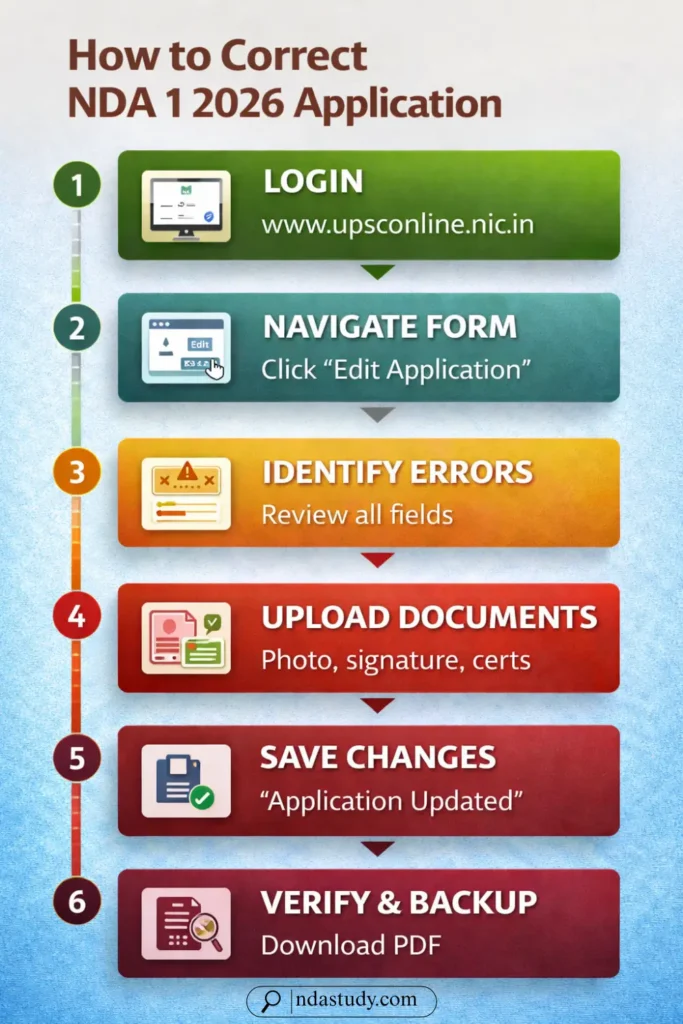
Step 1 – Log In to the UPSC Portal
To start the NDA 1 2026 application editing, visit the official UPSC portal at www.upsconline.nic.in using a secure internet connection. Click on the “Applicant Login” or “Sign In” option and enter your Registration ID, password, and the displayed captcha code. Depending on the UPSC portal access settings, you may need to verify through an OTP on your registered email or mobile. If you’ve forgotten your password, reset it at least 24 hours before the correction window closes—never leave this to the final day when the portal experiences heavy traffic.
Step 2 – Navigate to the Application Form
Once logged in, you’ll see your UPSC dashboard displaying application status, fee payment details, and essential notifications. Locate and click on the “Edit Application” or “Modify Application” button under your NDA 1 2026 listing. Ensure your form shows an “Editable” status—not “Locked” or “Rejected”, which means editing isn’t allowed. This interface is the central area for candidates searching for how to correct the NDA 1 2026 application online. Review all sections carefully before proceeding to avoid repeating errors during the edit process.
Step 3 – Identify & Edit Errors
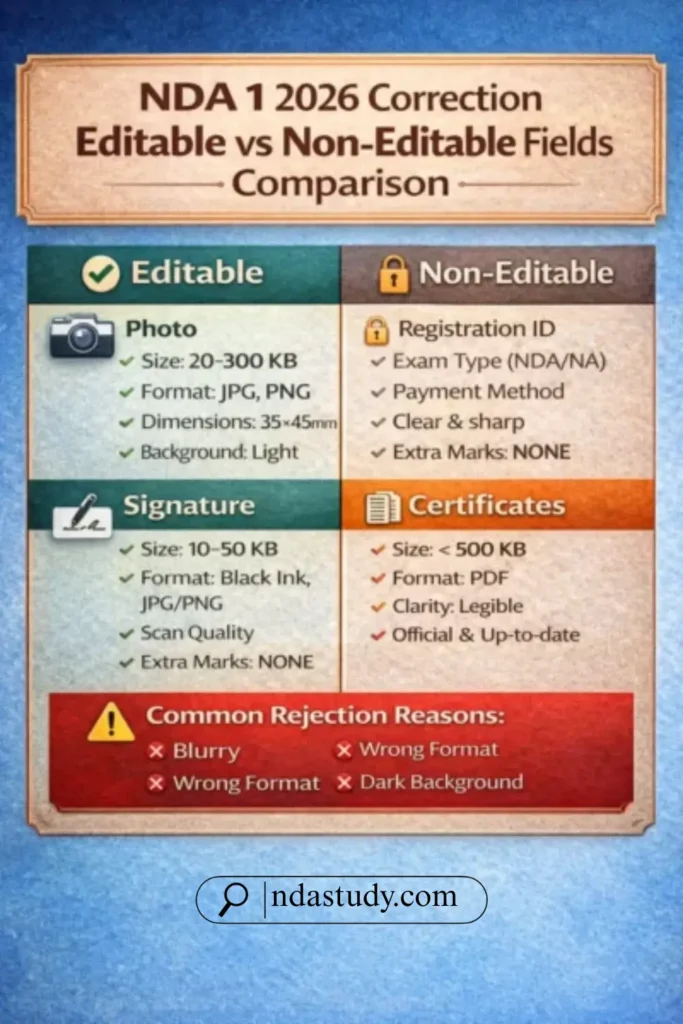
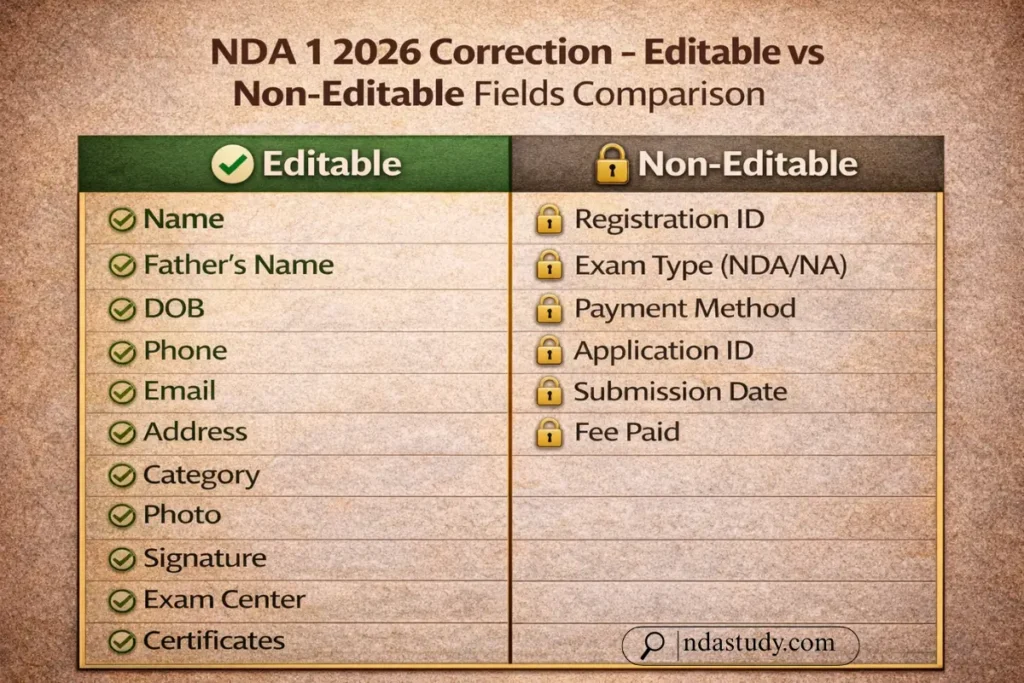
After opening your application form, take time to identify fields needing correction. Editable fields generally include your name, father’s name, date of birth (limited), contact info (phone number, email, address), category/subcategory details, exam centre preferences (if enabled), and uploaded documents like photo, signature, or certificates.
However, note that certain sections—like your registration number, exam type (NDA vs. NA), and submitted payment mode—are non-editable once submitted.
Check for common mistakes: spelling or spacing errors in your personal details, a mismatched category, or unclear uploaded photos. Candidates often overlook small details that cause rejection during verification.
Tip: Recheck every field, even those that seem correct—small issues like inconsistent phone digits or file format mismatches lead to application disqualification. This comprehensive review ensures you understand what can be corrected in the NDA 1 2026 application accurately before saving changes.
Step 4 – Upload Corrected Documents (If Needed)
If your previous uploads didn’t meet UPSC standards, you can re-upload them during correction. For the photo, maintain a recent passport-size image, 20–300 KB, with a light background and visible face. The signature must be scanned in black ink, within the same size range. Academic certificates or caste proofs, if requested, should be uploaded in PDF format. Remove old files before re-uploading.
Accepted file formats include JPG, JPEG, PNG, and PDF as stated on the NDA 1 2026 form correction official website. Failure to meet specifications may lead to rejection. Always preview each upload before saving to ensure clarity and compliance with UPSC standards.
Step 5 – Save & Submit Your Changes
Once all corrections are applied, scroll to the bottom of the page and review every edit carefully. Click the “Save” button to finalise your updates. A confirmation message such as “Application Updated Successfully” will appear on-screen.
Do not close your browser or refresh immediately—wait 2–3 seconds to let the UPSC server sync your changes. For your records, download and save the revised application copy. This version will serve as proof of correction if queried during document verification or SSB screening.
Step 6 – Verify Your Corrections
After submission, log out fully and log in again to verify if all details have updated successfully. Reopen your form and double-check corrected fields—especially name, photo, exam centre, and signature. If any field shows old data or unrefreshed details, retry the correction immediately within the active window period.
Tip: Don’t wait until the last-minute UPSC server rush. Always complete verification a day before the deadline. Finally, download and store the updated PDF version safely. This careful review completes the edit application process, ensuring your NDA form is accurate, complete, and compliant for final submission.
Common Mistakes & How to Avoid Them
The UPSC NDA 1 correction window dates are strict and unforgiving—one small mistake can cost your chance to appear for the exam. Here are the most common errors aspirants make during form correction and simple strategies to avoid them:
Also Know:
- Waiting until the last hour: UPSC servers often slow down or crash in the final hours. Always complete your edits at least 24 hours before the window closes.
- Uploading low-quality documents: Blurry or wrongly sized photos and signatures lead to rejection. Use clear, scanned images meeting UPSC pixel and size requirements.
- Changing exam centre multiple times: You can edit this field only once, so choose carefully and confirm availability in your preferred city.
- Not saving after editing: Many lose data by closing the page prematurely. Always click “Save” and wait for the “Update Successful” message before exiting.
- Exceeding file size limits: Stick to UPSC’s specified file formats (.JPG, .PNG, .PDF) and keep them below 300 KB for smooth uploads.
Following these correction tips ensures a flawless submission before the UPSC NDA 1 correction window dates expire.
Official Resources & Quick Links
For accurate updates on the UPSC NDA 1 2026 application correction, always rely on official government platforms. Visit the UPSC official website www.upsc.gov.in for authentic announcements. Access the direct NDA 1 2026 notification page under the “Examinations” section or visit https://www.upsconline.nic.in for form correction access.
Candidates can also contact the UPSC Facilitation Counter at 011-23381125 / 23098543 / 23385271 during working hours (10 AM–5 PM) for assistance. Check the official FAQ section and UPSC’s verified social media pages on X (Twitter) and Facebook for exam-related alerts.
⚠️ Always verify dates and links from official sources; this article is for guidance only. [But data & facts are 100% accurate with official sources & authorities]
All official links provide high-authority credibility and ensure safe access to the NDA form correction portal.
FAQs | NDA 1 2026 Correction Window open
1. How to correct the NDA 1 2026 application during the UPSC correction window?
Visit www.upsconline.nic.in, log in with your registration ID and password, then click on “Edit Application.” Follow the step-by-step guide carefully before the window closes to avoid form rejection.
2. Can I change my exam centre during the correction window?
Yes, if allowed by UPSC. Most candidates can change their preferred exam centre once, depending on seat availability and server load.
3. What if I’ve already paid the exam fee—will I need to pay again?
No. The exam fee is valid for your entire application, even after corrections. No extra payment is required during editing.
4. What happens if I miss the UPSC NDA 1 correction window dates?
The application locks permanently after closing. No further changes are permitted—not during document verification or SSB stages.
5. Is the correction window the same for all NDA exams?
No. Each NDA cycle—NDA 1 and NDA 2—has separate correction dates. Always check the latest notification on NDA Study & upsc.gov.in.
Final Tips & Action Plan
You’re now fully prepared to use the NDA 1 2026 correction window smoothly and confidently. Begin editing as soon as the portal opens—ideally within the first two days—and finish at least 24 hours before the deadline to avoid last-minute server delays. Remember, even small updates can make a big difference in your selection process.
✅ Action Checklist:
- Mark the official correction window dates on your calendar.
- Prepare corrected documents (photo, signature, certificates) in advance.
- Log in early—at least 24 hours before closing—to test access.
- Make corrections carefully, reviewing every editable field.
- Download your updated application for safe recordkeeping.
You’ve got this—millions of aspirants correct their applications successfully every year!
💬 Comment below if you have questions—we’ll help you out!


![Is Mathematics Compulsory for NDA? Arts/Commerce Students Must Read This [EXCLUSIVE ]](https://ndastudy.com/wp-content/uploads/2025/12/Is-Mathematics-Compulsory-for-NDA-300x169.webp "Is Mathematics Compulsory for NDA? Arts/Commerce Students Must Read This [EXCLUSIVE ] 11")